Product

Every agent, every model, every dollar — in one calm console.

OpenBurnBar reads what your agents already leave behind on disk and turns it into a coherent picture: today's burn, this week's pattern, this month's budget, every session you ran, every quota window you're about to hit.

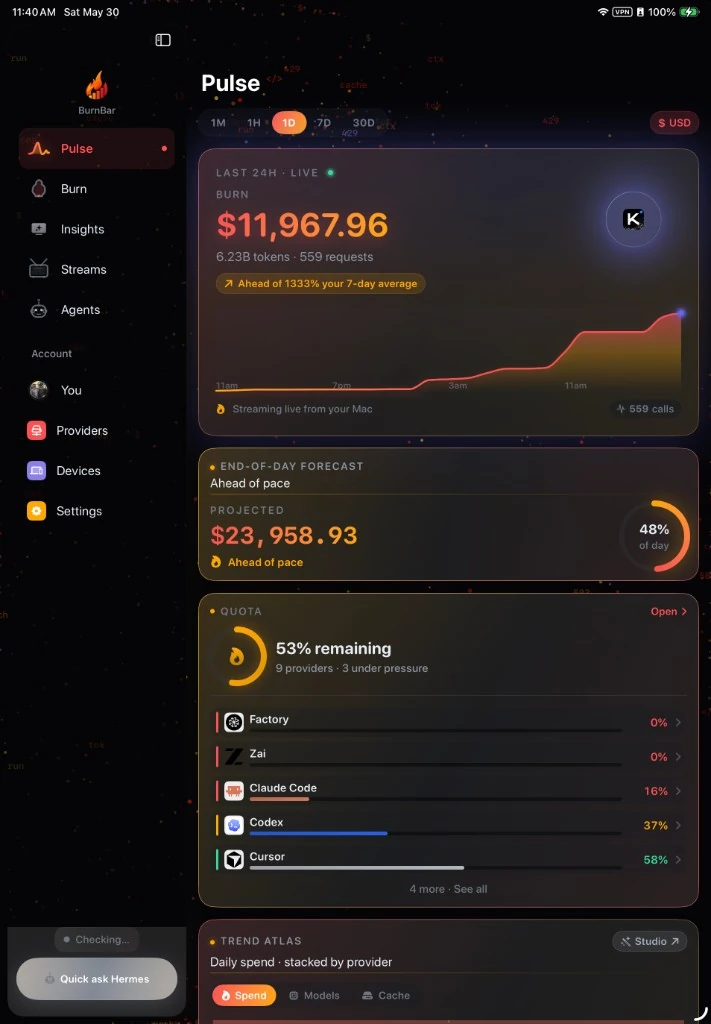
OpenBurnBar iPadOS app — Pulse tab streaming live from the Mac: $11,967.96 burned in the last 24h across 6.23B tokens and 559 requests, ahead of the 7-day average, $23,958.93 end-of-day forecast, 53% quota remaining across 9 providers
Real iPadOS capture · Pulse tab · streaming live from your Mac
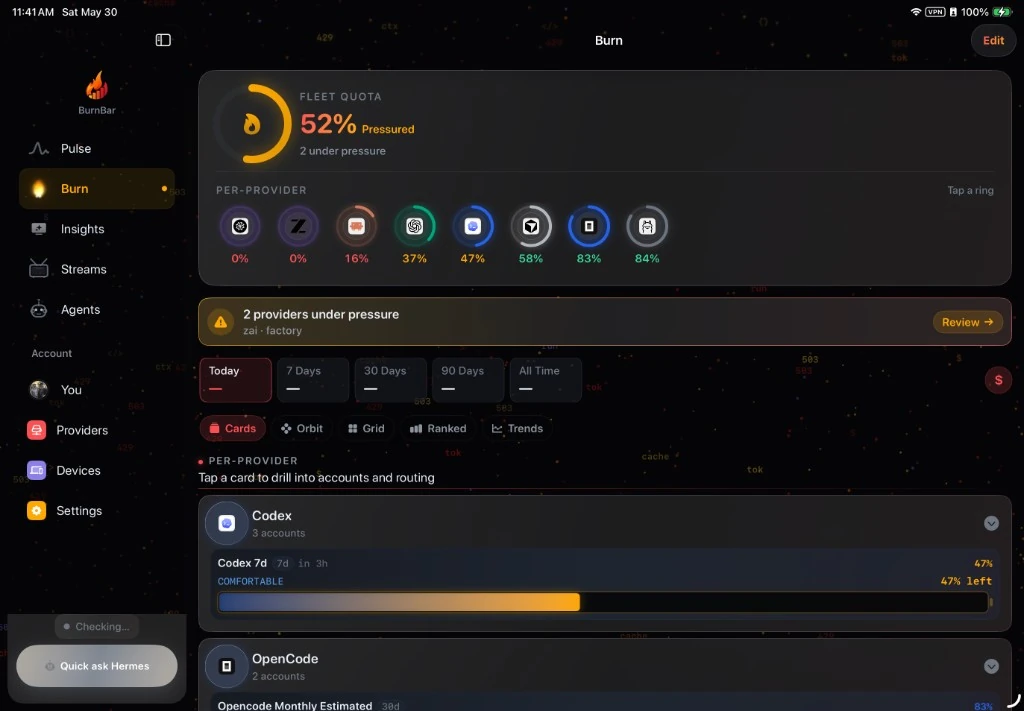
OpenBurnBar iPadOS app — Burn tab with Fleet Quota 52% Pressured, eight per-provider rings (Codex 47%, Cursor 58%, and more), and a Today / 7d / 30d / 90d / All-Time window switcher above per-provider cards
Real iPadOS capture · Burn tab · same SwiftUI design renders on macOS
Shipping (per-device QA matrix)

Google Nest Hub

Google · 7-inch smart display · Cast V2

BurnBar casts a live provider dashboard to the Nest Hub on your kitchen counter. Refresh, brightness, theme, and provider filter are all controlled from the Mac app.

  • Cast V2 + Home Assistant blueprints — no third-party server
  • Provider rail, big-total, ambient, photo-blend layouts ship today
  • Acceptance probe before "healthy" — `docs/SMART_DISPLAY_DEVICE_QA.md`

Shipping (per-device QA matrix)

ULANZI TC001

Pixel clock · 32×8 LED matrix · AWTRIX HTTP

A faithful 32×8 LED matrix render — same glyph tables, same palette, same per-pixel glow blur the BurnBar daemon paints to AWTRIX firmware.

  • AWTRIX HTTP — works on stock or community firmware
  • Four layouts · provider dashboard, quota carousel, burn status, alerts
  • Ember & whimsy palette by default · five palettes ship

See every BurnBar surface →

Tracking

Cost, tokens, quota — local and live.

Numbers come from the vendor's own API or local logs. Confidence is labeled on every row.

  • Reads logs, not API keys

    OpenBurnBar reads the JSONL crumbs Claude Code, Codex, Factory and friends drop on disk. Your BYOK keys are stored in the macOS Keychain and sent only to the providers you choose — BurnBar's servers never receive them in plaintext.

  • Cost and tokens — today, this week, this month, all-time

    Real numbers. Cost is exact where the vendor returns it, computed where they don't. Confidence is labeled on every row.

  • Quota — distinct from spend

    Five-hour windows for Claude Code and Codex. Weekly for Kimi. Premium interactions for Copilot. Per-model for MiniMax. Plan-used USD for Cursor. Refresh on tap.

  • Insights that learn your rhythm

    OpenBurnBar notices when spend spikes, a new model shows up, or a quota window is about to close — and tells you, with a daily summary at the time you choose.

  • Set a limit it actually holds

    Give a project or an account a spending cap. When it's reached, agents stop — they don't quietly blow past it. A real brake, not just a warning light.

Routing

Same model in. Same model out. Two ways to recover.

The same daemon ships two postures. Provider-Family Failover protects your model identity and extends capacity across every account in your library that carries it inside the selected provider family. Exact Model Failover can recover across providers or accounts only after the destination proves the same canonical model ID. Benchmarks remain advisory signals — they never prove identity.

  • default

    Provider-Family Failover

    Pin an account. Add more accounts that also carry that model. When the primary throttles, the runner-up serves the next request — never a different model, never across the wire-format family. If no account survives, the gateway returns a structured 503.

    • Model identity is preserved on every failover
    • Pinned account wins when healthy · runner-up pre-selected
    • 5-minute cool-down on transient failures · auto-rejoin
    • Account-level routing — no quota pool collapse
  • opt-in

    Exact Model Failover

    Let the router look beyond the selected provider family only when the next route can prove the same canonical model. gpt-5.4 may move to another provider's real gpt-5.4; it cannot become gpt-5.4-mini, gpt-5.4-pro, or a broad openai:standard substitute.

    • Canonical model ID is the hard gate
    • Provider/account can change after recoverable failures
    • Similar models, family wrappers, and capability classes are rejected
    • Every decision logs original route, destination, reason, and invariant status
Hermes

An assistant that knows your data.

Two runtimes share one identity. Stateless per-turn against a CLI subprocess for quick answers, or multi-turn against a local Hermes Gateway for deeper sessions — both grounded in your own OpenBurnBar SQLite.

  • Hermes — chat over your own data

    An on-device assistant that knows your sessions, providers, models, and recent runs. Two modes — Local Index (stateless, CLI-backed) and Hermes Gateway (multi-turn, OpenAI-shaped, runs locally).

  • Conversation Atoms

    Every entity Hermes mentions — cost, session, provider, model, window, tool, project — becomes a tappable inline chip that opens the matching native detail view.

  • Answers that draw themselves

    Ask about your spend and the answer comes back as a chart you can read at a glance — built on the spot from your own numbers, on iPhone and iPad.

  • A daily read on where the money went

    One clear briefing — what changed, what drove it, what's about to run out, and what to do next — in plain language, with the charts to back it up.

Control plane

One daemon, every surface.

The daemon owns provider routing, quota refresh, retrieval, projects, missions, and a JSONL run journal you can replay. The CLI scripts it. Every other surface speaks to it.

  • Daemon-first control plane

    A launchd-managed local daemon owns routing, quota, retrieval, projects, missions, and replay. Every surface — Mac, iOS, Cursor, CLI — talks to it.

  • Fire Hydrant — same-format routing across every account

    Two on-device pools: OpenAI-family (Cursor, Factory, Forge, OpenCode, Codex CLI → Z.ai, MiniMax, Kimi, OpenAI, Ollama) and Anthropic-family (Claude Code → Anthropic Console + Anthropic Pro/Team). When one account exhausts, rate-limits, or fails auth, the router shifts traffic to the next healthy account in the same pool — no cross-format translation, no vendor lock-in, no 429s in your IDE.

  • openburnbar — a real command line

    Everything the app does, scriptable from your terminal, a git hook, or another agent. Same brain as the menu bar, no extra account.

  • Connect once, stay connected

    Set up routing a single time. If another app resets your configuration, OpenBurnBar quietly puts it back — you never reconnect by hand.

  • Bring in what you already use

    It finds the agents and accounts already set up on your Mac and pulls them in — no hunting for keys, no copy-paste.

  • Hand off a job, watch it land

    Give an agent a task, follow it from pending to done, and sign off on the big moves. Every job tracks its own cost so you always know what it spent.

  • Carry context to the next agent

    What one agent learned doesn't have to die with the session. One click bundles the history that matters in the format your next tool expects.

  • Type a little, get the whole thing

    Save the prompts and snippets you retype all day. Type a short trigger and it expands to the full text — across your apps, synced to your other devices.

Floo · your phone & your Mac

Your phone and your Mac, joined.

Your Mac does the work. Your phone is the window — and the remote. See it, steer it, send files, take a call, even unlock it, from across the room or across town.

Built · rolling out Floo — File & Live Object Overlay (a.k.a. Fast Link Over Owl)

  • See your Mac from your phone

    Open a live view of your Mac on your iPhone or iPad — the whole desktop, or just the one window you care about. Watch a long agent run from the couch.

  • Reach in and take over

    Tap, scroll, and type on your Mac straight from your phone. Touch a text field and your keyboard rises and zooms to it — no pinching, no hunting.

  • Send a file in a tap

    Move a file, a screenshot, or a photo between Mac and phone instantly — in either direction. It picks up where it left off if your signal drops.

  • Call your Mac

    Start a voice or video call between your devices. Your phone rings like any call; answer and you are connected — even when the app was closed.

  • One clipboard across both

    Copy on your Mac, paste on your phone. Copy on your phone, paste on your Mac. Whatever you just grabbed is already on the other screen.

  • Unlock your Mac from your phone

    Walk up to a locked Mac and unlock it from your phone with Face ID or Touch ID. Your password is biometric-gated and sealed end to end between your paired devices — it never lands in a BurnBar log or on our servers; only your Mac opens it to type it locally.

Safe by design

  • It only ever connects your own devices — the ones you've paired and trust.
  • Payloads are sealed between your paired devices. The relay still sees routing metadata, never the screen, file, call, or clipboard contents.
  • Every connection asks first. Decline and it backs off.
  • One tap ends it — the screen view, the call, the control, all of it, instantly.
Agent Control

Let an agent use the computer — only when you say so.

Some jobs are faster if the agent just does them — clicks the buttons, fills the forms, works the apps. OpenBurnBar lets it, on a leash you hold. It does nothing you didn't allow, and you can stop it in an instant.

Direct download · behind your grant

  • Watch it work

    See exactly what your agent is doing as it does it — every click, every step — live on your Mac or mirrored to your phone. Nothing happens out of sight.

  • Let it run the browser for you

    Hand off the busywork — fill the form, pull the data, click through the flow. The agent drives a real browser while you keep your hands free.

  • Let it use the Mac

    Beyond the browser, the agent can use your apps the way you would — when you grant it that reach, and never before.

  • Approve each step — or trust it within your lines

    Run it tap-by-tap, approving every action. Or set the boundaries once and let it move freely inside them. You choose how much rope, per task.

  • Draw the off-limits zones

    Mark windows, sites, and screen areas the agent may never touch — password fields, your banking tab, anything private. Deny always wins.

  • A tamper-proof record of everything

    Every action the agent takes is written to a record that can't be quietly edited after the fact. You can always see precisely what happened.

You're always in charge

  • It does nothing until you grant it — and you grant powers per task, not forever.
  • Grants expire on their own; switch tasks and the reach resets to zero.
  • Stop it instantly — a keyboard shortcut, a gesture on your phone, or the moment the lock screen appears.
  • Prefer it never have this reach? The Mac App Store build ships without it entirely. This lives only in the direct download.
Surfaces

The screens it shows up on.

    Shipping macOS 14+

    macOS menu bar app

    The home base. Lives in the menu bar, reads local agent logs, surfaces cost, tokens, quota, sessions, and insights.

    • LSUIElement — no Dock icon, no windows stealing focus
    • Dashboard, providers, models, sessions, projects, streams, search
    • Hermes chat panel sits inside the dashboard
    • Daily digest, smart insights, quota refresh, daemon-backed control plane
    • Optional Firebase sync, optional iCloud session mirror, optional Sentry diagnostics
    Download for macOS
    In App Store review iOS 17+

    iPhone & iPad companion

    Your whole burn picture, in your pocket. The Mac does the work; the phone and tablet show it — and reach back to it.

    • See spend the moment it happens — charts drawn from your own numbers
    • Live on the lock screen and Dynamic Island, plus a “What's my burn today?” Siri shortcut
    • Floo — see, steer, and unlock your Mac right from your phone
    • Watch an agent work, or approve its moves, on the go
    • Ask your Mac's assistant from anywhere — privately (paid)
    iOS launch status
    Source-only beta Cursor / VS Code 1.95+

    Cursor & VS Code extension

    An activity-bar panel that hooks into the daemon over the local UNIX socket. Build locally and load unpacked — no marketplace listing yet.

    • Burn for the active workspace, scoped to the current Cursor agent run
    • Quota panel pulled from the same daemon the menu bar reads
    • Routed-provider gateway support — Z.ai, MiniMax, Ollama Cloud via Cloudflare tunnel
    • Open VSX / VS Marketplace publication is on the roadmap, not shipped
    Editor setup
    Shipping Embedded in macOS app

    Local daemon

    The control plane. A launchd-managed UNIX socket service every surface talks to.

    • Auth-token-gated JSON-RPC + HTTP gateway
    • Owns provider routing, quota refresh, retrieval, mission control
    • JSONL run journal — every agent invocation, every tool call, replayable
    • Repairs itself when launched from a stale plist or moved app bundle
    Shipping macOS

    Command-line interface

    openburnbar — eight commands for scripting, agents, and operators. Same daemon, no extra account.

    • health · controller · questions · followups · missions
    • mission-approve · simulator-runs · simulator-replay
    • Pipes cleanly into git hooks, CI, and other agent scripts
    Shipping (with iOS app) iOS / iPadOS

    Widgets & Live Activity

    Lock-screen quota, Dynamic Island countdown, home-screen cost sparkline. Siri shortcut: "What's my burn today?"

    • Hero small, cost sparkline medium, dashboard large
    • Live Activity on iOS 16.1+ with top provider + tokens + cost
    • App Intents for Spotlight + Siri
    Shipping (per-device QA matrix) Nest Hub · Pixel Clock · Chromecast

    Smart displays

    One-click "Make display work" — casts a live OpenBurnBar dashboard, with proof of acceptance before marking healthy.

    • Google Nest Hub via Cast V2 + Home Assistant blueprints
    • ULANZI TC001 via AWTRIX HTTP or stock-firmware simulator
    • Per-device QA matrix gates support claims — see docs/SMART_DISPLAY_DEVICE_QA.md
    See the live mockups
    Feature-complete · Play Store pending Android 8+

    Android companion

    Everything the iPhone app does, now on Android — your burn, your sessions, the assistant, and Floo. Built and tested; not yet on the Play Store.

    • Full parity with the iPhone & iPad app, screen for screen
    • Floo media and the assistant, same as on iOS
    • Not yet distributed through the Play Store — that's the last step
    Shipping Local stdio · Hosted Streamable HTTP · macOS + any OS

    MCP integration

    Three Model Context Protocol surfaces let Codex, Claude Code, Cursor, Droid, Kimi, Forge, and Hermes query your OpenBurnBar history as grounded evidence — local SQLite for free, encrypted hosted memory for Pro.

    • Local Python MCP — 26 tools over your OpenBurnBar SQLite, read-mostly by default
    • Hosted Remote MCP — live at https://mcp.burnbar.ai/mcp, 8 tools, BurnBar Pro entitlement
    • Local stdio shim — bridges stdio-only clients to the hosted endpoint, decrypts on-device
    • Default privacy mode is local_decrypt_shim — server never sees plaintext queries or bodies
    See the MCP page
The honest part

What it doesn't pretend.

A clean console is built on what you choose to leave out as much as what you choose to put in.

  • Honest confidence labels

    Every provider row carries one of three labels — Exact, Estimated, Unavailable. We don't pretend to know what the vendor doesn't tell us.

  • Local-first by design

    Local SQLite + the local daemon are canonical. Firestore is an optional replication plane — never the source of truth. The whole product works offline.

Hermes Gateway · BurnBar Cloud

Connect Hermes through BurnBar Cloud

Choose BurnBar in Hermes the same way you'd choose Telegram or Signal. Approve a short code, and Hermes can receive your BurnBar messages and send replies back through your Cloud account.

Included with BurnBar Cloud & Cloud Pro Read the gateway docs
Hermes messaging platform
BurnBar Cloud your account

1

Choose BurnBar in Hermes

In Hermes' platform setup, pick BurnBar Cloud — right next to Telegram, Signal, and Slack.

2

Approve the code

Sign in to BurnBar and approve the short pairing code Hermes shows you. Takes seconds.

3

Send & receive from BurnBar

Hermes receives your BurnBar messages and sends replies back through your Cloud account.

Read it in code, not in marketing.

OpenBurnBar is AGPL-licensed. The README, the architecture doc, the threat model, the provider matrix, the changelog, and the corresponding source offer are all in the open.