iPhone
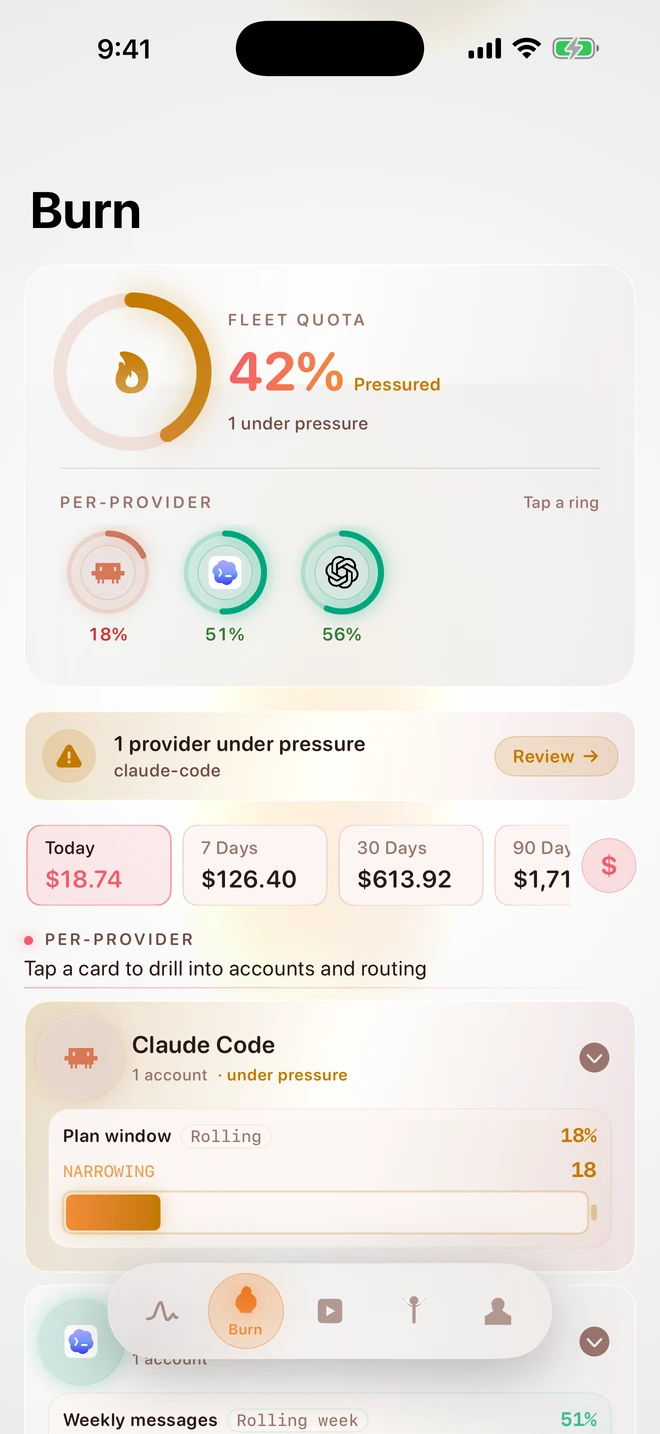
Burn tab · fleet quota 42% pressured
- Per-provider quota rings + cards
- Live Activity + Dynamic Island
- Siri shortcut: "What's my burn today?"
OpenBurnBar is a local-first developer tool that watches the AI coding agents you already use — Claude Code, Codex, Cursor, Copilot, Factory, MiniMax, and more — and gives you a live read on tokens burned, dollars spent, and quota left, across all of them, on your machine. Every token leaves a trail. BurnBar reads the fire.
 Claude Code
  Codex
Codex  Cursor
  OpenAI
  Copilot
  Factory
  MiniMax
  OpenBurnBar
  Claude Code
 LaHormigaDormida · not en…
OpenBurnBar is built for the kind of developer who has three agents open in parallel and only checks the bill at the end of the month. Three things shape every decision in the product.
The canonical store is a local SQLite database, run by a local daemon under your user account. Firebase is an optional replication plane, not the source of truth. The whole product works offline.
How the privacy model worksEvery provider row carries one of three labels — exact, estimated, unavailable. We don't pretend to know what the vendor doesn't tell us.
See the full provider matrixA single daemon owns routing, quota, retrieval, projects, and missions. Every surface — macOS, iOS, iPad, Cursor, VS Code, CLI, widgets, smart displays — speaks to the same daemon. One source of truth, many windows in.
Tour the productThe macOS app is dense by design. Today's burn, top providers, quota windows that matter, and an on-device assistant that knows your data — one keystroke away.
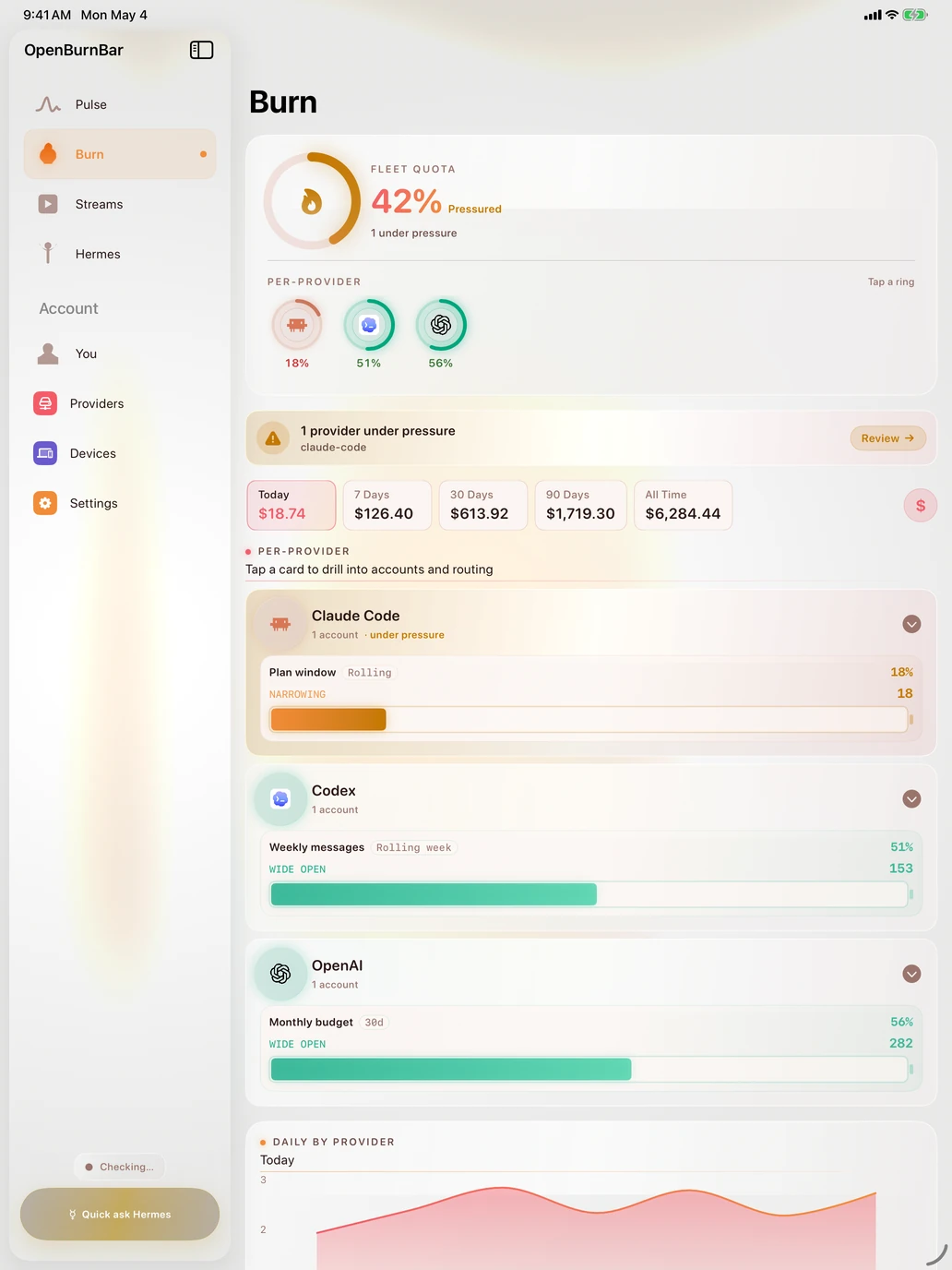
The Mac records. The phone and tablet render. Companion apps stream the same daemon data; widgets and Live Activity surface the burn even without opening the app.
Burn tab · fleet quota 42% pressured
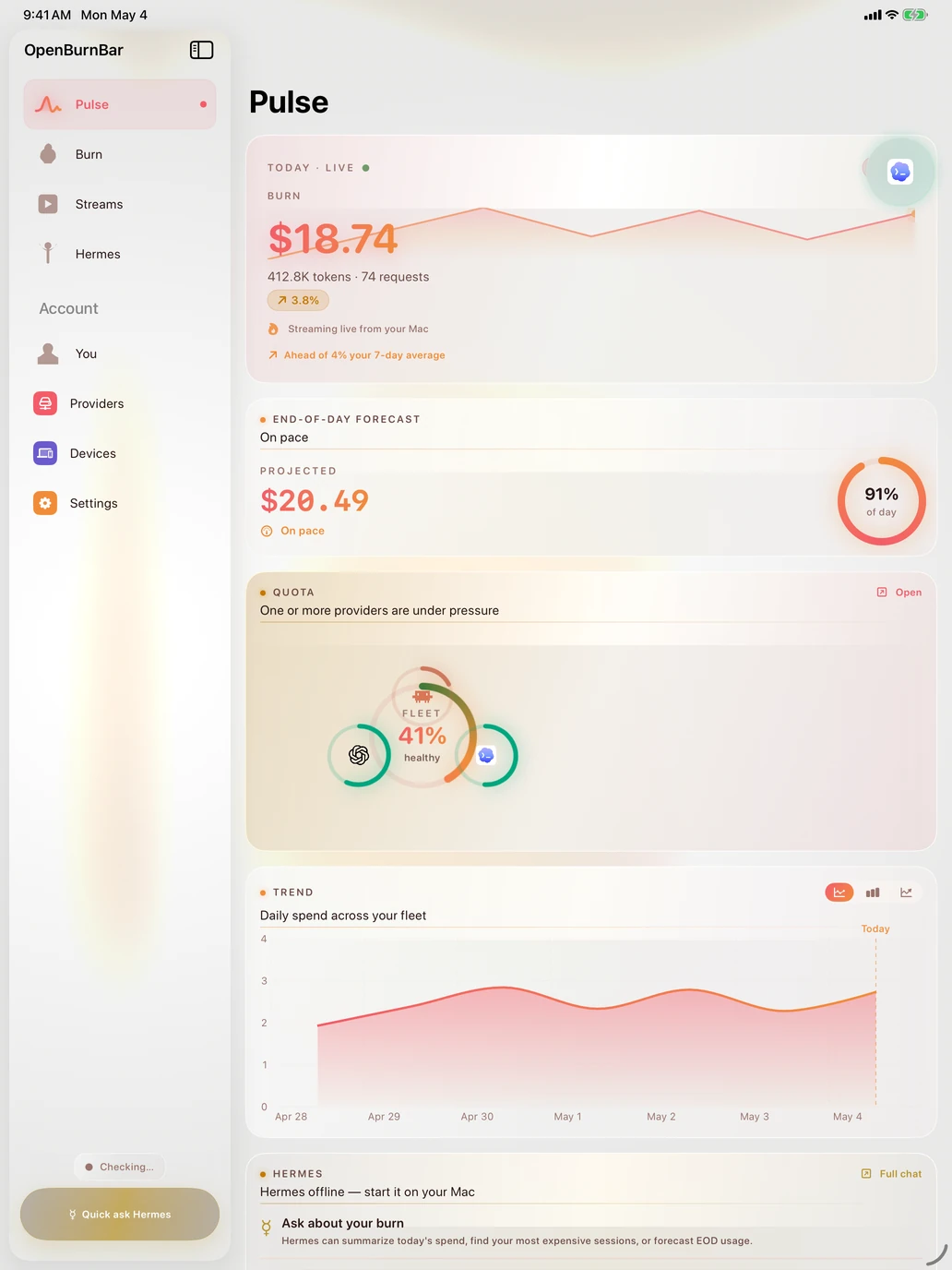
Pulse · adaptive split-view · ⌘1–4 · ⌘R · ⌘H
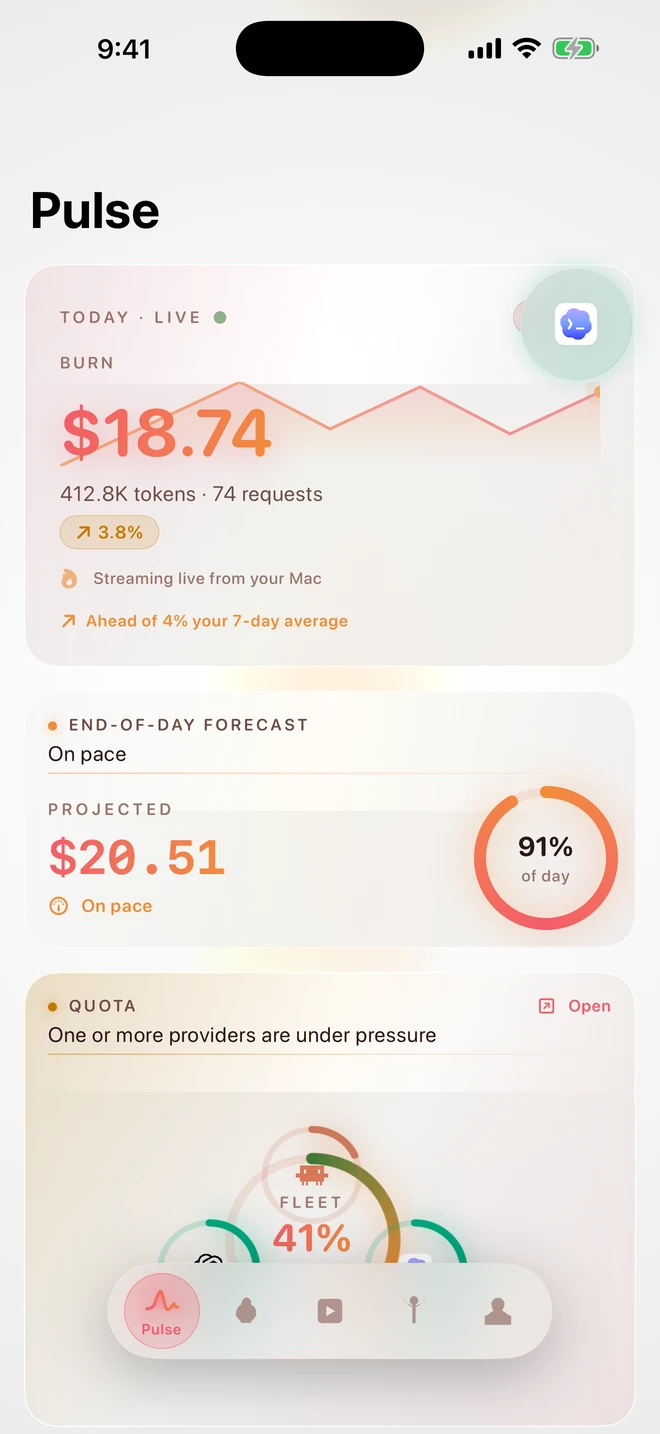
Pulse · streaming live from your Mac
Your menu bar is one surface. Your Nest Hub on the kitchen counter and your Ulanzi pixel clock on the desk are two more — already shipping. The mockups below are faithful re-renders of the in-app preview code, hydrated from today's live router rundown.
Google · 7-inch smart display · Cast V2
 live provider pressure Refresh
 BurnBar casts a live provider dashboard to the Nest Hub on your kitchen counter. Refresh, brightness, theme, and provider filter are all controlled from the Mac app.
Pixel clock · 32×8 LED matrix · AWTRIX HTTP
A faithful 32×8 LED matrix render — same glyph tables, same palette, same per-pixel glow blur the BurnBar daemon paints to AWTRIX firmware.
23 providers ship with real usage data today. 8 more are detected at install but don't expose data — so we show "Installed / Not installed" and stop there.
Selected · see Providers for the full matrix
| Provider | Where the data comes from | Cost | Quota | Credential |
|---|---|---|---|---|
| Claude Code Anthropic's CLI agent — reads ~/.claude/projects/**/*.jsonl | Local JSONL + statusline bridge | exact | yes | none (local) |
| Codex (OpenAI CLI) ChatGPT's coding CLI — reads ~/.codex/sessions/rollout-*.jsonl | Local rollout JSONL | exact | yes | none (local) or ~/.codex/auth.json for hosted refresh |
| OpenAI Organization-wide usage from the admin API | /v1/organization/usage/completions | exact | partial | Org admin key (sk-…) |
| GitHub Copilot Per-seat premium-interaction + chat limits | api.github.com/copilot_internal/user | estimated | yes | GitHub OAuth or PAT (read:user) |
| Cursor Plan usage in USD straight from Cursor's web API | cursor.com/api/usage-summary | exact | yes | Workos session token (auto-extracted) |
| Factory (Droid) Plan tier + rolling 5h/7d/30d windows, lane-aware | factory.ai org subscription + local session settings | exact | partial | WorkOS browser session captured by FactoryLoginHelper |
| MiniMax Coding Plan remaining quota per model | minimax.io coding-plan endpoint | exact | yes | Coding Plan key sk-cp-… |
 Warp Request credits, refresh windows, bonus grants | app.warp.dev GraphQL | exact | yes | wk-… API key |
Every screen you care about — and a few you didn't expect — talks to the same local daemon. Multi-agent work needs multi-surface visibility.
The home base. Lives in the menu bar, reads local agent logs, surfaces cost, tokens, quota, sessions, and insights.
Your whole burn picture, in your pocket. The Mac does the work; the phone and tablet show it — and reach back to it.
An activity-bar panel that hooks into the daemon over the local UNIX socket. Build locally and load unpacked — no marketplace listing yet.
The control plane. A launchd-managed UNIX socket service every surface talks to.
openburnbar — eight commands for scripting, agents, and operators. Same daemon, no extra account.
Lock-screen quota, Dynamic Island countdown, home-screen cost sparkline. Siri shortcut: "What's my burn today?"
One-click "Make display work" — casts a live OpenBurnBar dashboard, with proof of acceptance before marking healthy.
Everything the iPhone app does, now on Android — your burn, your sessions, the assistant, and Floo. Built and tested; not yet on the Play Store.
Failover swaps the account · the model id never moves
BurnBar's local gateway preserves the exact model you asked for. Your gpt-5.5 stays gpt-5.5; your claude-opus-4-7 stays itself. The router picks from accounts in your library that already carry that model — and if none survive, it returns a structured 503 instead of a silent substitute. Two modes ship: Provider-Family Failover (default, stay inside the selected provider family) and Exact Model Failover (opt-in, cross provider/account only after canonical model proof). Benchmarks are advisory; they never authorize a model swap.
Ask, in plain language, what your week looked like. What model burned the most cache. Which window is about to roll over. Hermes pulls context from your local SQLite — your sessions, providers, models, tools — and answers right there, in chat.
OpenBurnBar started as the calmest way to see your spend. It grew into the calmest way to run your whole setup — from your phone, and through your agents — without ever giving up control.
See your Mac from your phone, reach in and control it, send files, take a call, even unlock it. Only your own devices. Encrypted end to end. You approve every connection.
Explore Floo Direct download · behind your grantHand off the busywork and let an agent click, type, and work your apps. Watch every move, approve each step or set the limits, and stop it in an instant. It only ever does what you allow.
How it stays safeChoose BurnBar in Hermes the same way you'd choose Telegram or Signal. Approve a short code, and Hermes can receive your BurnBar messages and send replies back through your Cloud account.
Included with BurnBar Cloud & Cloud Pro Read the gateway docs Hermes messaging platform BurnBar Cloud your account
 BurnBar sits right alongside the messengers you already trust.
In Hermes' platform setup, pick BurnBar Cloud — right next to Telegram, Signal, and Slack.
Sign in to BurnBar and approve the short pairing code Hermes shows you. Takes seconds.
Hermes receives your BurnBar messages and sends replies back through your Cloud account.
All processing happens on your device. No telemetry, no analytics, no crash reports — nothing is transmitted unless you explicitly opt in. And when you do opt into cloud, your content leaves sealed — what stays readable is labeled operational metadata, domain by domain, in a ledger you can audit.
Where the seal holds — the relay sees ciphertext only. The full map →
OpenBurnBar is AGPL-licensed, signed and notarized for macOS, and ready to run today.